LLM gateway
The LLM gateway intercepts your agents' inference traffic. It complements the MCP gateway, which governs tool traffic, so that all of an agent's traffic runs through Mintive (formerly MintMCP) and is guarded the same way.
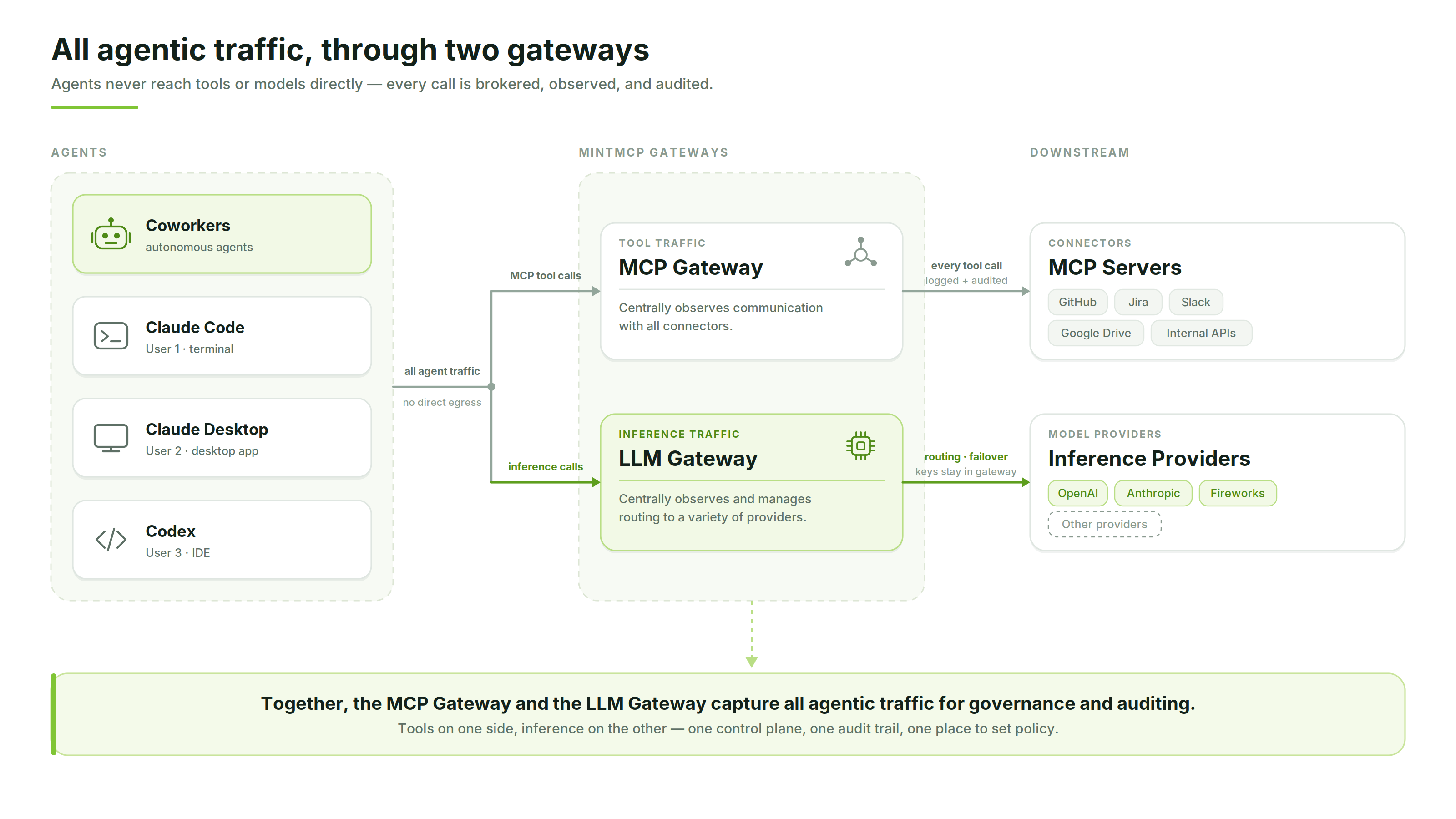
The LLM gateway is in early access. Contact us to enable it for your organization.
What the LLM gateway does
- Broad harness coverage. The gateway works across a wide variety of agent harnesses, so you govern inference regardless of which app a person or coworker agent uses. See Supported harnesses.
- Budgets and model restrictions for flexible groups. Assign spend budgets and allowed-model lists to the groups and teams in your organization, using the same identities you already manage in Mintive.
- Easy provider swapping. Connect providers like OpenAI, Anthropic, and Fireworks, and switch between them without rewiring each agent.
Supported harnesses
Route these harnesses through the gateway, using the setup path listed for each:
| Harness | How to connect it |
|---|---|
| Claude Code | Local installer or MDM rollout |
| Claude Desktop | Local installer or MDM rollout |
| Codex | Local installer or MDM rollout |
| ChatGPT Work (ChatGPT desktop app) | Local installer or MDM rollout, by configuring Codex, because ChatGPT Work reads Codex's configuration |
| OpenCode, pi, and omp | Local installer or MDM rollout |
| Coworker Agents | Select a gateway policy in the agent's settings (Coworker integration) |
| Agents you build with an SDK | Set the base URL and auth token (Agent SDKs) |
How LLM gateway policies control access, models and spend
You govern the gateway through policies. A policy is where you set who can use the gateway, which provider and models they get, and how much they can spend. Because policies use Mintive's access control, the same users and groups you manage elsewhere carry over, so different teams can run under separate policies with their own budgets and model restrictions.
Get started
Connect a provider, create a policy, and run the installer to send your first request through the gateway. See Get started with the LLM gateway.
Next steps
- Access control: grant teams and users access to a policy
- Budgets: cap and manage spend per policy and per user
- Model restrictions: choose which models a policy allows and set defaults
- Provider and model catalog: see supported providers and models
- Monitoring and analysis: review inference calls and usage
- Local installer: configure a machine's harnesses with the installer
- MDM rollout: deploy the gateway setup to larger teams
- Agent SDKs: connect agents you build with an SDK
- Coworker integration: route Coworker Agents through the gateway