PRODUCT UPDATES

Changelog

New features and releases in Mintive (formerly MintMCP), newest first. RSS feed.

Ambient coworker agents and agent credentials

Coworker agents can follow up in Slack on their own

Having to @-mention an agent on every message makes a thread feel like a form, not a conversation. Ambient mode lets a coworker agent reply in a Slack thread it's already part of without a fresh @-mention each time.

A Slack thread in #releases where the on-call coworker agent confirms, without being @-mentioned again, that the 14:00 deploy is safe to roll back.

Turn it on from the Ambient card on the agent's Settings tab.

Docs: Ambient mode

Agent credentials from your secret manager

A token pasted into one more system is one more copy to rotate. Agent identity bearer tokens can now come from AWS Secrets Manager, the same way connector credentials already do.

Set the source on the agent identity's credential form and Mintive reads the secret at request time instead of storing a token you paste in. See Secret providers to configure one.

Docs: Secret providers, Agent identities

Build and query VMCPs from your MCP client

Admins who live in Claude or Cursor had to switch to the web app to set up a new bundle. The Admin MCP server picked up three tools: create_vmcp bundles your installed connectors into a new VMCP, update_vmcp_connectors swaps the connector set on an existing one, and query_agent_logs pulls agent-monitor activity by user, agent, or session.

Docs: Admin MCP

Also in this release

API key permissions and MCP usage analytics

Choose who can create API keys

API keys give programmatic access to MCPs, so not every member needs to create them. The permission to create API keys is no longer enabled by default for regular members, and you can enable it for custom roles to control who can use it.

Docs: Roles and permissions

Find out who uses which MCPs, from your agent

Usage questions like who uses which MCPs used to mean exporting logs and building a report. The Admin MCP server now comes with new tools, including the ability to query MCP and agent monitor logs.

If you're trying to figure out who is using which MCPs, or which MCPs are most popular in the organization, you can use these tools with your agent to get the analysis you need.

Docs: Admin MCP

Also in this release

  • More MCP admin tools

    The Admin MCP server can also manage connectors, enable and disable tools, create bundles, and manage middleware rules.

  • Codex agent monitor

    Agent Monitor now integrates with OpenAI's Codex.

  • Guardrails

    We've changed the UI for applying guardrails and middleware to the agent monitor and MCP gateway. Middleware, including middleware that calls out to your DLP, can be attached to the agent monitor so that hooks in Claude, Cursor, and Codex call out to it.

Okta Cross App Access and tool approvals

Mintive and Okta partner on Cross App Access

Static API keys for agents are hard to scope and harder to revoke. Agents that connect through the Okta identity provider can now get a short-lived access token for the underlying app, using the policies you already run and leaving a revocable audit trail instead of static API keys.

This is part of the MCP spec's Enterprise-managed Auth, and it is available for Mintive enterprise organizations. See Cross App Access.

Docs: Cross App Access

Hold new catalog tools until an admin approves them

Third-party MCP servers can change their tool list at any time. You can now set an organization-level default that keeps any newly added tool off until an admin turns it on, so you decide what users can reach across every server.

Org-wide connector settings with the Enable new tools by default switch, Slack alerts, and per-tool toggles.

Docs: Tool governance, Tool change notifications

Passthrough headers for remote MCPs

Some upstream tools key off your own auth headers, which a gateway would normally strip. Remote MCP gateway admins can now allowlist HTTP headers to pass from the client through to underlying servers, so those tools keep working.

Docs: Pass-through headers

Also in this release

  • Customize the MCP access-request prompt

    The message users see when requesting tool access is now editable in the gateway approval settings. Set ticket-number requirements, what context to include, and where the request routes.

  • Minty help chat

    In-app support now runs on our own chat widget with Minty built in.

  • Direct IdP redirect on SSO login

    Organizations with SSO now go straight to their identity provider at login, removing an interstitial step.

  • Inline access-grant editor

    The VMCP access-policy tab now edits grants inline, so you add or remove them without leaving the page.

  • Configurable agent identity email

    Each agent bundle can forward a specific email identity to underlying MCP servers, useful when downstream tools check caller identity for access control.

A governed bundle for each agent type

Each agent type gets its own governed bundle

Shared credentials make it impossible to scope access per agent or to tell agent actions from human actions in your logs. Now you can create one VMCP per agent type. Each bundle gets its own credential and reaches only the tools you assign it.

A list of agent VMCPs such as Architecture Diagrammer and Data Quality Sentinel, each combining its own connectors, with Ready or Needs auth status.

Agent VMCPs show N/A in the Access column on the VMCP list.

Docs: Agent identities

Permission delegation is signed and auditable

Without a signed record of who granted an agent what, access reviews come down to trust. Access grants are now the source of truth for what each bundle can reach: grant each agent type exactly the permissions it needs in gateway settings.

Every change is cryptographically signed, recorded in the new Access Policy Audit History tab, and exportable to your SIEM or OTLP endpoint. Revoking an agent's access or rotating its credentials is one operation. Custom roles now include credential broker permissions for finer delegation. See Roles and permissions.

Docs: Roles and permissions, Audit and observability

Each agent bundle carries its own credentials

Sharing one GitHub credential across agents blurs who did what and needs setup in every session. Agent setup no longer needs the Claude GitHub app; standard GitHub OAuth is enough.

GitHub tokens are brokered into agent sandbox sessions automatically, and each bundle runs under its own GitHub identity without sharing credentials or per-session setup.

Docs: Agent identities

Also in this release

Human approval and private MCP tunnels

Require human sign-off on any tool call

Some tool calls, like sending money or deleting data, should never run on an agent's say-so. Set an approval policy on any tool and its calls queue until a person confirms them in the web UI. This holds even when Claude is in auto-approval mode: nothing runs without the sign-off.

No client changes are needed, and every approval is logged. Configure it per tool from the policy settings on any VMCP, so you gate the exact operations you care about instead of the whole server.

Docs: Tool approval

Reach internal MCP servers without a public endpoint

Exposing an internal MCP server to the internet just so a gateway can reach it is a non-starter for most security teams. Private tunnels are available on Enterprise for connecting to MCP servers inside your VPC with no public endpoint.

The tunnel runs through a reverse proxy locked to the gateway. Email founders@mintive.com to get onboarded. See Private network tunnel.

Docs: Private network tunnel

200+ MCP servers, governed from the start

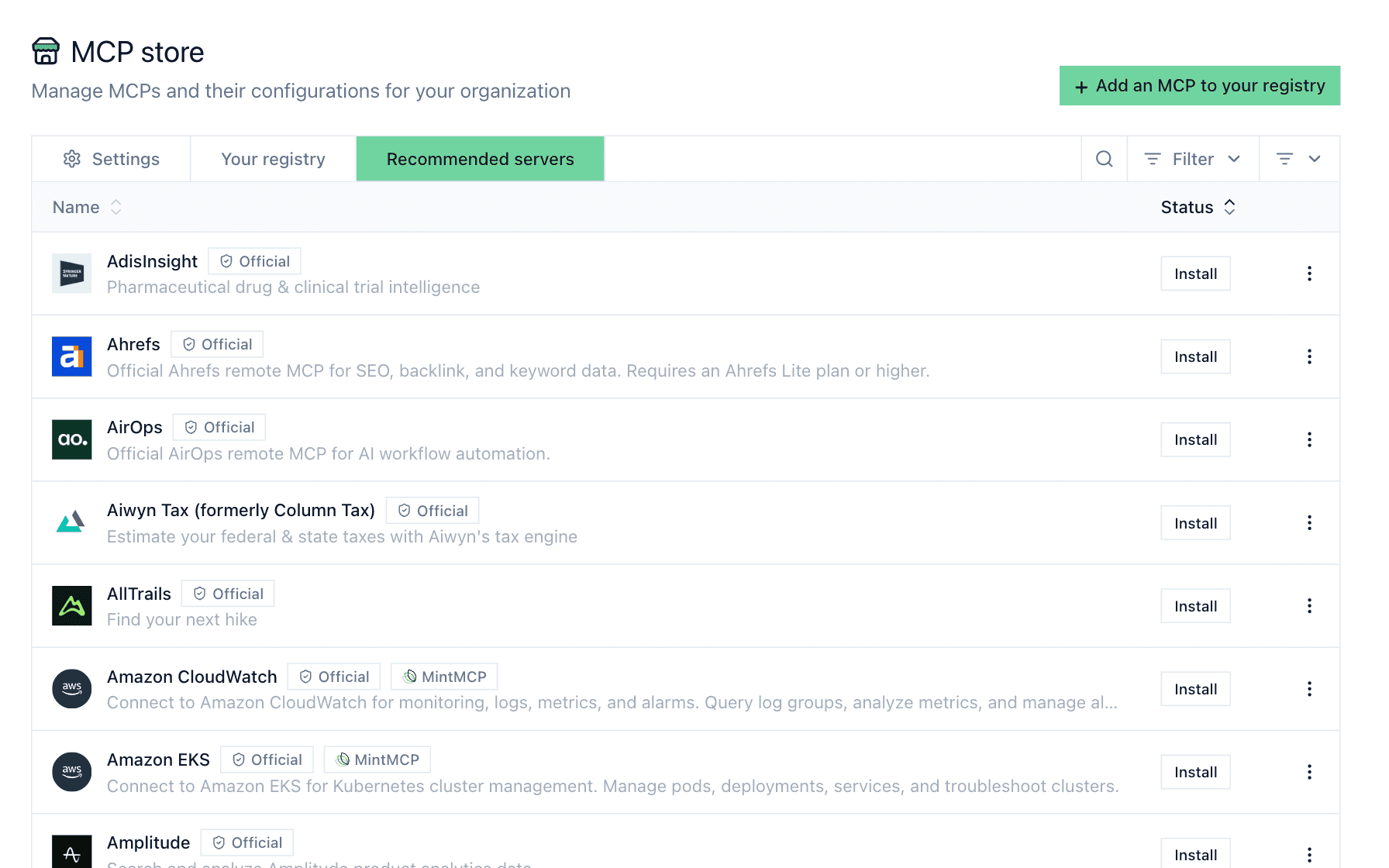
Adopting a new MCP server usually means vetting and wiring up controls for it from scratch. The catalog now includes 200+ MCP servers from Anthropic's official registry, so you can adopt the wider ecosystem with the same governance and controls applied to everything else.

The MCP store's recommended servers tab listing official registry servers such as Ahrefs, AirOps and Amazon CloudWatch, each with an Install button.

Docs: Add a hosted connector

Also in this release

Run your agents on Mintive

Connect your agents, tools and models through one gateway, and see every call in the log.

No sales call needed!